> ## Documentation Index
> Fetch the complete documentation index at: https://docs.fga.dev/llms.txt
> Use this file to discover all available pages before exploring further.
# Modeling Custom Roles
> Modeling custom and dynamically changing roles in your system
In this guide you'll learn how to model custom roles in your system using [Auth0 FGA](https://docs.fga.dev/fga.md).
For example, a Business-to-Business (B2B) application could allow customers to create their own custom roles on the application to grant their users.
**When to use**
In many cases, roles would fit in well as relations on an object type, as seen in [Modeling Roles and Permissions](https://docs.fga.dev/modeling/basics/roles-and-permissions.md). In some cases, however, they may not be enough.
Custom roles are useful when:
* Users of the application are able to create arbitrary sets of roles with different permissions that govern the users' access to objects.
* It is not known beforehand (at the time of Authorization Model creation) what the application roles are.
* The team responsible for building the authorization model is different from the teams responsible for defining roles and access to the application.
## Before you start
Before you start this guide, make sure you're familiar with some [Auth0 FGA Concepts](https://docs.fga.dev/fga-concepts.md) and know how to develop the things listed below.
### Initial Model
To start, let's say there is an application with a [type](https://docs.fga.dev/fga-concepts.md#what-is-a-type) called `asset-category`. Users can have view and/or edit access to assets in that category. Any user who can edit can also view.
We'll start with the following authorization model showing a system with an `asset-category` type. This type allows users to have view and edit access to it.
***
In addition, you'll need to know the following:
### Modeling Roles and Permissions
You need to know how to add users to groups and grant groups access to resources. [Learn more →](https://docs.fga.dev/modeling/basics/user-groups.md)
### Modeling Object-to-Object Relationships
You need to know how to create relationships between objects and how that might affect a user's relationships to those objects. [Learn more →](https://docs.fga.dev/modeling/concepts/object-to-object-relationships.md)
### Concepts & Configuration Language
* [Auth0 FGA Concepts](https://docs.fga.dev/fga-concepts.md)
* [Configuration Language](https://docs.fga.dev/modeling/configuration-language.md)
[The Playground
Try this guide out on the Auth0 FGA Playground](https://play.fga.dev/sandbox/?store=custom-roles)
## Step By Step
Starting with the authorization model mentioned above, we want to enable users to create their own custom roles, and tie permissions to those roles to our two users and to the permissions on the logo asset category.
For this guide, we'll model a scenario where a certain organization using our app has created an `asset-category` called "logos", and another called "text content".
The company administrator would like to create:
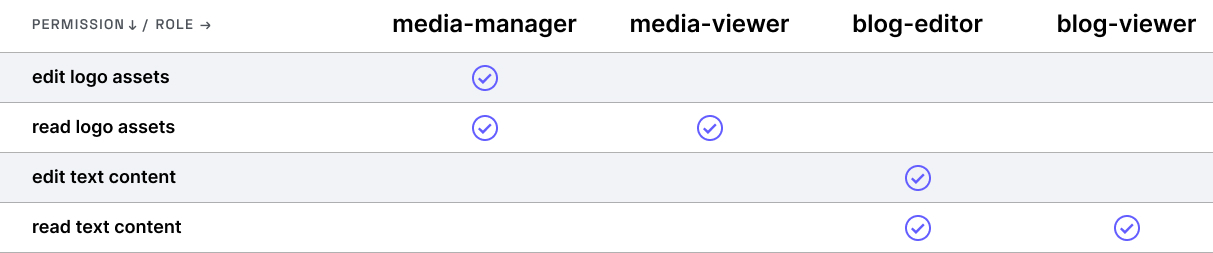
* a **media-manager** role that allows users to **edit** assets in the **logos asset category**
* a **media-viewer** role that allows users to **view** all assets in the **logos asset category**
* a **blog-editor** role that allows users to **edit** all assets in the **text content asset category**
* a **blog-viewer** role that allows users to **view** all assets in the **text content asset category**
Imagine these are what the permissions the roles in one organization using our service are like:
Finally, the administrator wants to assign **Anne** the **media-manager** role and **Beth** the **media-viewer** role.
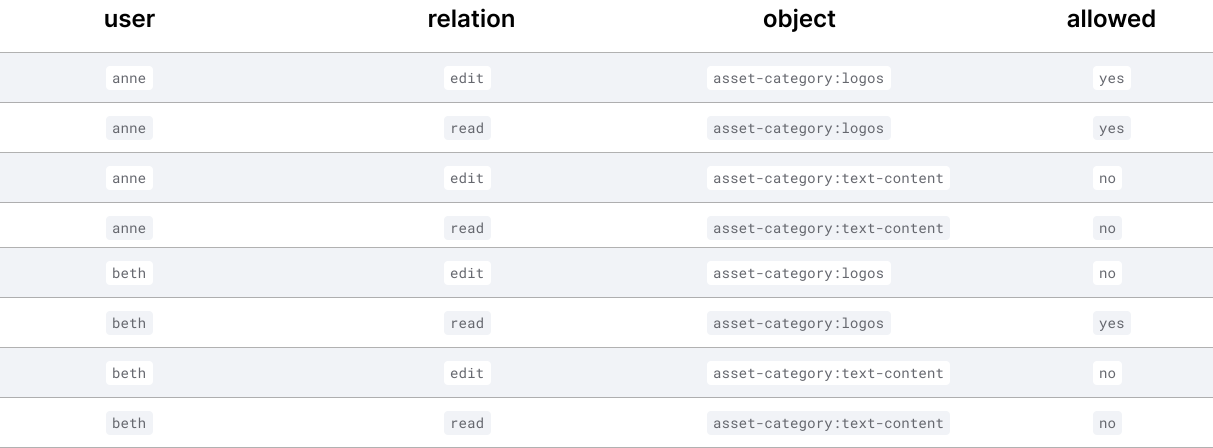
At the end, we'll verify our model by ensuring the following access [check](https://docs.fga.dev/fga-concepts.md#what-is-a-check-request) requests return the expected result.
In order to do this, we need to:
- Update the Authorization Model to add a Role Type
- Use Relationship Tuples to tie the Users to the Roles
- Use Relationship Tuples to associate Permissions with the Roles
- Verify that the Authorization Model works
### 01. Update The Authorization Model To Add A Role Type
Because our roles are going to be dynamic and might change frequently, we represent them in a new type instead of as relations on that same type. We'll create new type called `role`, where users can be related as assignee to it.
The authorization model becomes this:
With this change we can add relationship tuples indicating that a certain user is `assigned` a certain `role`.
### 02.Use Relationship Tuples To Tie The Users To The Roles
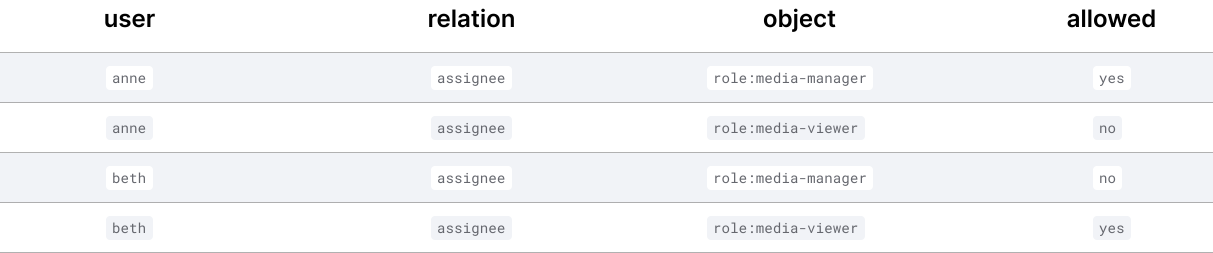
Once we've added the `role` type, we can assign roles to Anne and Beth. Anne is assigned the "media-manager" role and Beth is assigned the "media-viewer" role. We can do that by adding relationship tuples as follows:
We can verify they are members of said roles by issuing the following check requests:
### 03. Use Relationship Tuples To Associate Permissions With The Roles
With our users and roles set up, we still need to tie members of a certain role to it's corresponding permission(s).
### 04. Verify That The Authorization Model Works
To ensure our model works, it needs to match our expectations:

The checks come back as we expect, so our model is working correctly.
## Related Sections
Check the following sections for more on how to model with Auth0 FGA.
[Modeling Roles and Permissions
Learn how to remove the direct relationship to indicate nonassignable permissions.](https://docs.fga.dev/modeling/basics/roles-and-permissions.md)
[Modeling Concepts: Object to Object Relationships
Learn about how to model object to object relationships in Auth0 FGA.](https://docs.fga.dev/modeling/concepts/object-to-object-relationships.md)