

Auth0 Relationship Sync is currently in Beta, available to a limited set of customers, and not yet recommended for production use.
When to use
Use Auth0 Relationship Sync when:- You manage users, organizations, and/or roles in Auth0 and want to enforce fine-grained authorization in FGA without building and operating your own Auth0 Events API consumer.
- You want low latency between an Auth0 event and the FGA update: for example, when a user is removed from an organization, the resulting event is applied to FGA within seconds.
- You want FGA to handle consuming the Events API, including retry and resuming from where it left off, and are prepared to reconcile FGA against Auth0 periodically.
How it works
FGA is connected to Auth0 via a client to consume the Events API, a pull-based, cursor-driven stream distinct from push-based Event Streams. When users, organizations, and roles change in Auth0, events are emitted, and these events flow to a Sync pipeline. Customers define mapping rules to process these events and write or delete tuples in the FGA store, validating them directly in the FGA Dashboard before activating the Sync pipeline; see Validating a mapping file.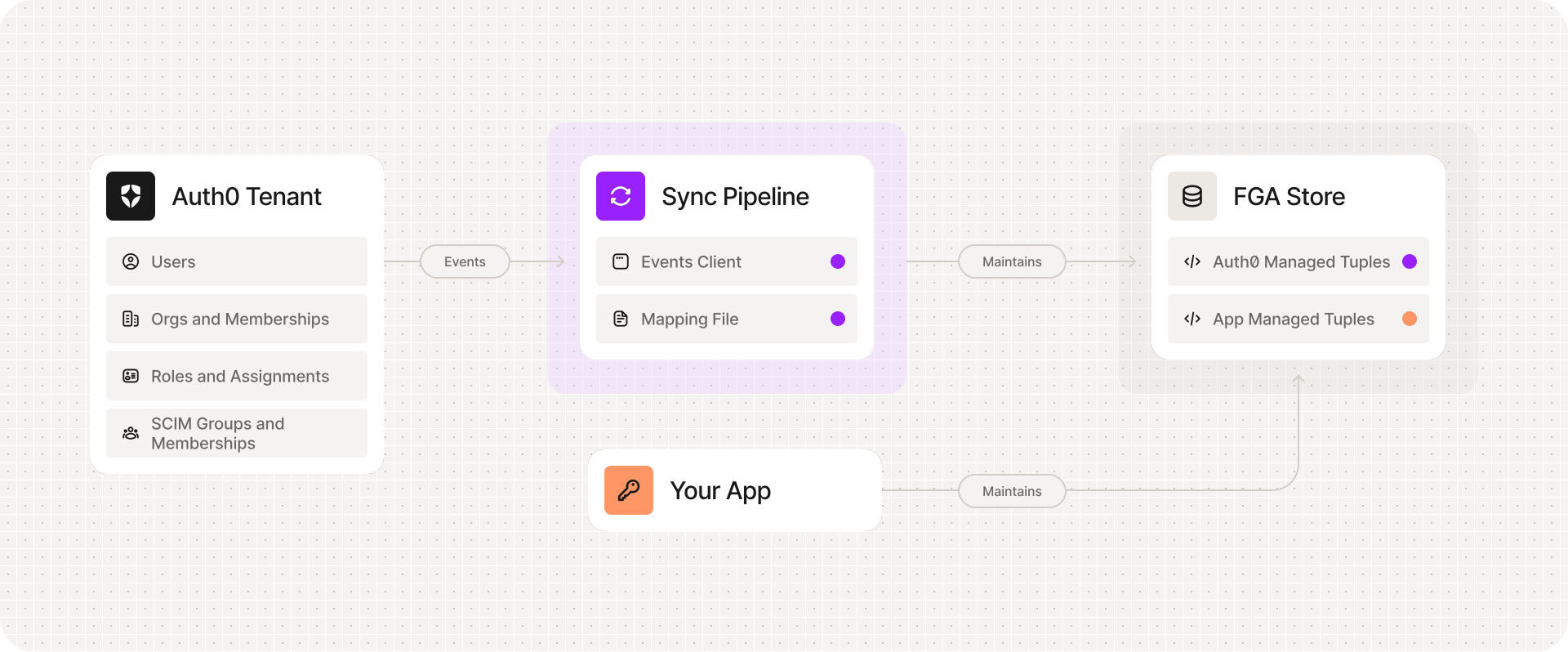
Data privacy
Data minimization. Don’t use email addresses, IP addresses, or other personally identifiable information as tupleuser/object identifiers. Prefer opaque Auth0 user IDs (user_id, e.g. auth0|abc123) and other opaque IDs (organization ID, group ID, role ID) instead — the same IDs the examples throughout this documentation set already use. Tuples are often copied into logs, exports, dashboards, and debugging workflows; an identifier that’s already opaque keeps PII from spreading into every system that consumes them.
Possible data transfers. If the FGA data store is located in a different region than your Auth0 tenant, that leads to data transfers between those regions.
What data can you sync
Supported entities
Auth0 Relationship Sync can react to changes in the following Auth0 entities and update or delete FGA tuples.
Tenant roles come from the tenant-wide role catalog; Auth0 calls these “Tenant roles,” as distinct from “Organization roles,” a separate, per-organization role catalog that’s in Early Access and has no corresponding event yet, so it can’t be synced regardless of stage. The linked doc above covers both.
If you provision users and groups from an upstream identity provider into Auth0 via inbound SCIM, those entities sync the same way as natively-created ones; see Auth0’s Configure inbound SCIM doc.
Supported Auth0 events
See the Auth0 events catalog for the full list of events and their payload shapes.
Known limitations
Event delivery and consistency
FGA guarantees that every event it consumes from the Auth0 Events API is applied to your store. What FGA receives is determined by Auth0, which currently doesn’t guarantee that:- every change in Auth0 produces an event, or
- events are delivered in the order the changes happened when changes race.
PAUSED_CURSOR_LOST in the status reference. Periodically verify FGA against Auth0 and reconcile if needed; see Backfilling and reconciling.
Roles have no CRUD events
Creating, updating, or deleting a role from an Auth0 tenant does not trigger any events. Deletion is the most consequential gap: if a role is deleted while still assigned to users, the corresponding FGA tuples go stale with no event to react to. Avoid deleting roles that are in active use, or clean up FGA tuples manually before deleting the role in Auth0.No event for tenant-level role assignment outside an org
Auth0 emitsorganization.member.role.assigned/.deleted only for a role assigned to a user within an organization. Keep tenant-level role assignment scoped to within an organization membership if you want it reflected in FGA.
Removing a user from an organization doesn’t clean up their assigned roles, by itself
organization.member.deleted fires when a user leaves an organization, or when the organization itself is deleted, but organization.member.role.deleted does not, in either case, and the payload never includes which roles the user held. A role-assignment tuple can outlive the membership it was granted under unless your mapping accounts for this. If your model writes roles as relations on the organization itself, see Cleaning up roles on membership removal. Otherwise, see Roles for a pattern that wires role assignments through an intermediate object, so a single delete on membership removal revokes every role tied to it without needing to know which roles the user held.
group.deleted does not cascade
When a group is deleted, Auth0 emits only the single group.deleted event; it does not fan out per-member removal events. Your mapping must explicitly clean up all group-related tuples in the group.deleted rule using a full-delete tuple_filters entry; see Cleaning up group tuples on group deletion.
organization.deleted cascades membership, but not directly roles
When an organization is deleted, Auth0 does emit organization.member.deleted for every member, so member tuples clean up through that event, the same one covered above. It does not emit organization.member.role.deleted, the same gap as above — but since that event is what your “Remove user from organization” rule already handles, no separate cleanup rule is needed for organization.deleted itself; the per-member cascade covers it.
Duplicate role assignments
Assigning a role to a user who already has it re-firesorganization.member.role.assigned, unchanged. This is safe: every write a Sync pipeline performs ignores conflicts rather than failing (see Idempotent writes and deletes), but don’t assume the event only fires once per assignment.
Next: Getting Started with Auth0 Relationship Sync to set up your first Sync pipeline, Use-Cases for complete, end-to-end mappings covering everything in the tables above, or Working with Mapping Files for how to validate a mapping.