Getting Started with the FGA Permissions Index
This guide walks through how to start using the FGA Permissions Index.
Prerequisites
Before requesting an index, make sure you have:
- An Auth0 FGA Enterprise subscription.
- An Auth0 FGA store (e.g.,
store_id=01KJZV40TT1ZB0A1S5V24Q0JYB). - An authorization model (e.g.,
authorization_model_id=01KJZV4R5NER0D3K4A6X9MJ2S5) deployed. - The relation to be indexed (e.g.,
document#can_view)- The relation must be supported by the FGA Permissions Index (also called the Indexable Path). See Model Limitations for unsupported model patterns for the Permissions Index.
(Optional) Test Store
If you want to test the Permissions Index without connecting to your existing FGA data, you can create a new store and use a demo authorization model:
- Download the demo .fga.yaml file
- Navigate to the FGA Dashboard.
- Create a new store called
test-permissions-index. - Navigate to the Model Explorer page.
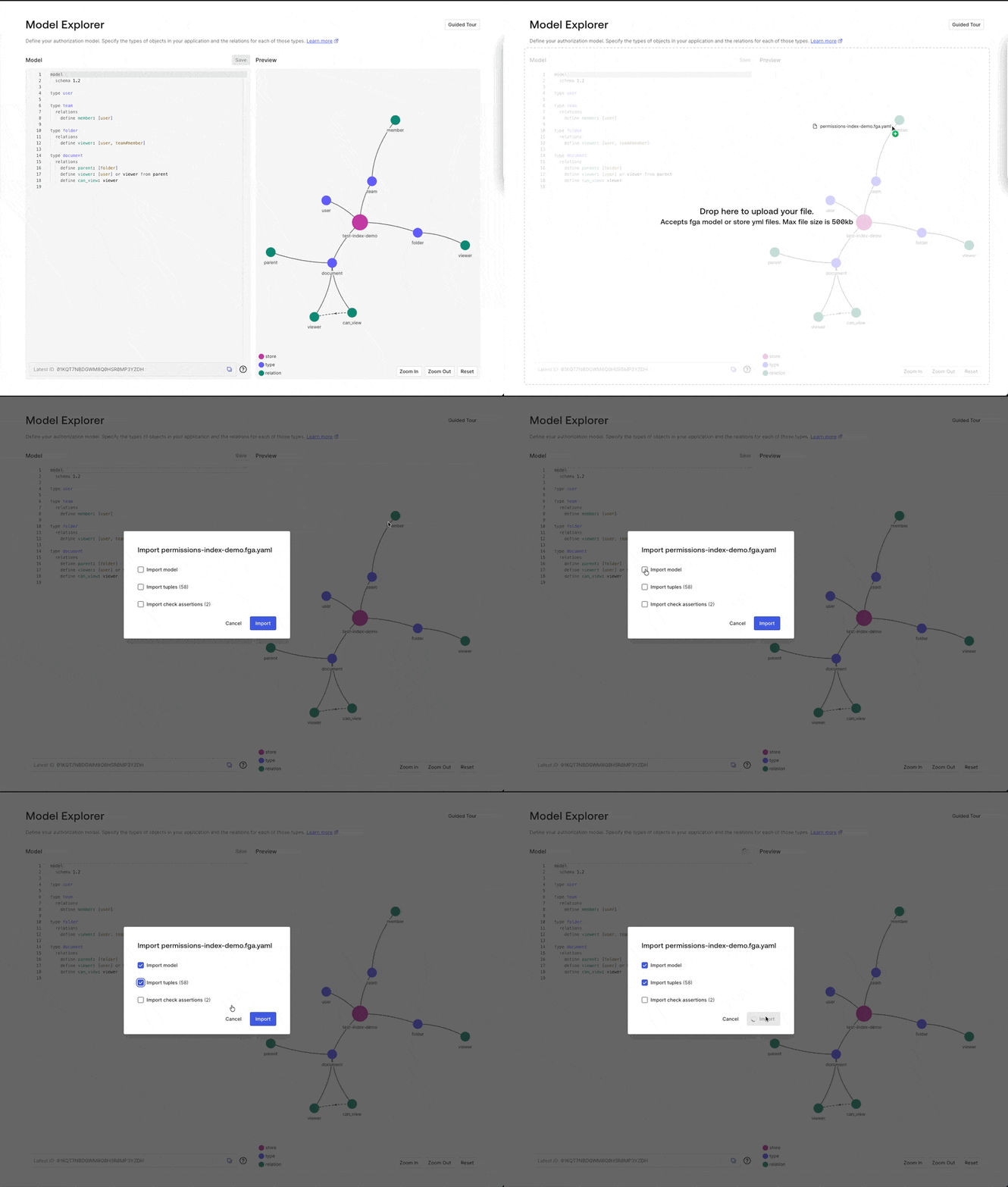
- Drag the downloaded
permissions-index-demo.fga.yamlfile into the Model Explorer to upload the model and tuples. - Select
Import modelandImport tuples. This will seed your store with the model and tuples.
Step 1: Create An Index
Developer Preview: Creating a Permissions Index is a manual process for now. Self-service index creation, via an API and the FGA Dashboard, is planned for General Availability (GA).
To create an index, contact your Auth0 FGA Account Executive (AE) or Technical Account Manager (TAM) and provide:
- Store ID (
store_id) - Authorization Model ID (
authorization_model_id) - The relation to be indexed (e.g.,
document#can_view)
Once the index is created, you will receive an Index ID (a ULID, e.g., 01KJZVQNY35CWGXYEB164AWKJE).
Step 2: Configure Client Credentials
After receiving your index_id, you need to configure API client credentials with the appropriate permissions to access the Permissions Index API endpoints.
Create client credentials for your application:
- In the FGA Dashboard, navigate to the Store Settings page and create or manage a client.
- Enable Read Permissions Index access to grant your client the ability to 1) list all indexes, 2) read the details of a specific index, and 3) read streamed expansion events.
Save the Client ID and Client Secret, which you will use to obtain a Bearer token for authenticating your API requests in the next step.
Step 3: Authenticate
All Permissions Index endpoints require a Bearer authentication token. Obtain one using the OAuth2 client credentials flow, as described in Call the API guide.
All access tokens are short-lived tokens. Cache the token for reuse and obtain a new one before expiry to avoid interruptions on the expansions stream.
Step 4: Call the Permissions Index API Endpoints
The Permissions Index API has three main endpoints:
List Indexes
Returns a list of all the indexes in the store, including all metadata for each specific index.
- Node.JS
- Go
- .NET
- Python
- Java
- CURL
const response = await fgaClient.executeApiRequest({
    operationName: 'ListIndexes',        // For telemetry/logging
    method: 'GET',
    path: '/stores/{store_id}/indexes',
    pathParams: {
        store_id: process.env.FGA_STORE_ID,
    },
});

console.log("Indexes", response.indexes)
req := openfga.NewAPIExecutorRequestBuilder(
    "ListIndexes",
    "GET",
    "/stores/{store_id}/indexes",
).
    WithPathParameter("store_id", os.Getenv("FGA_STORE_ID")).
    Build()
resp, err := fgaClient.GetAPIExecutor().Execute(ctx, req)
if err != nil {
    log.Fatalf("failed to send request: %v", err)
}
fmt.Printf("indexes: %+v", string(resp.Body))
var request = RequestBuilder<object>
    .Create(
        HttpMethod.Get,
        configuration.ApiUrl,
        "/stores/{store_id}/indexes"
    )
    .WithPathParameter("store_id", Environment.GetEnvironmentVariable("FGA_STORE_ID"));

var response = await fgaClient.ApiExecutor.ExecuteAsync<object>(
    request,
    "ListIndexes"
);

Console.WriteLine(response.Data);
response = await fga_client.execute_api_request(
    operation_name="ListIndexes",
    method="GET",
    path="/stores/{store_id}/indexes",
    path_params={
        "store_id": os.environ['FGA_STORE_ID'],
    },
)

result = response.json()
print(f"Response: {result['indexes']}")
var request = ApiExecutorRequestBuilder.builder(
                HttpMethod.GET,
                "/stores/{store_id}/indexes"
        )
        .pathParam("store_id", System.getenv("FGA_STORE_ID"))
        .build();

var response = fgaClient.apiExecutor()
        .send(request, HashMap.class)
        .get();
System.out.println(response.getData().get("indexes"));
FGA_API_URL=https://api.us1.fga.dev
FGA_STORE_ID=your-store-id
FGA_MODEL_ID=your-model-id
FGA_INDEX_ID=your-index-id
FGA_TOKEN=your-bearer-token

curl "$FGA_API_URL/stores/$FGA_STORE_ID/indexes" \
    --header "Authorization: Bearer $FGA_TOKEN"
Get Index
Returns metadata for a specific index, including total tuples ingested, total expansions, expansion factor, and freshness.
- Node.JS
- Go
- .NET
- Python
- Java
- CURL
const response = await fgaClient.executeApiRequest({
    operationName: 'GetIndex',        // For telemetry/logging
    method: 'GET',
    path: '/stores/{store_id}/indexes/{index_id}',
    pathParams: {
        store_id: process.env.FGA_STORE_ID,
        index_id: process.env.FGA_INDEX_ID,
    },
});

console.log("index name", response.name)
req := openfga.NewAPIExecutorRequestBuilder(
    "GetIndex",
    "GET",
    "/stores/{store_id}/indexes/{index_id}",
).
    WithPathParameter("store_id", os.Getenv("FGA_STORE_ID")).
    WithPathParameter("index_id", os.Getenv("FGA_INDEX_ID")).
    Build()
resp, err := fgaClient.GetAPIExecutor().Execute(ctx, req)
if err != nil {
    log.Fatalf("failed to send request: %v", err)
}
fmt.Printf("index: %+v", string(resp.Body))
var request = RequestBuilder<object>
    .Create(
        HttpMethod.Get,
        configuration.ApiUrl,
        "/stores/{store_id}/indexes/{index_id}"
    )
    .WithPathParameter("store_id", Environment.GetEnvironmentVariable("FGA_STORE_ID"))
    .WithPathParameter("index_id", Environment.GetEnvironmentVariable("FGA_INDEX_ID"));

var response = await fgaClient.ApiExecutor.ExecuteAsync<object>(
    request,
    "GetIndex"
);

Console.WriteLine(response.Data);
response = await fga_client.execute_api_request(
    operation_name="GetIndex",
    method="GET",
    path="/stores/{store_id}/indexes/{index_id}",
    path_params={
        "store_id": os.environ['FGA_STORE_ID'],
        "index_id": os.environ['FGA_INDEX_ID'],
    },
)

result = response.json()
print(f"Response: {result['name']}")
var request = ApiExecutorRequestBuilder.builder(
                HttpMethod.GET,
                "/stores/{store_id}/indexes/{index_id}"
        )
        .pathParam("store_id", System.getenv("FGA_STORE_ID"))
        .pathParam("index_id", System.getenv("FGA_INDEX_ID"))
        .build();

var response = fgaClient.apiExecutor()
        .send(request, HashMap.class)
        .get();
System.out.println(response.getData().get("name"));
FGA_API_URL=https://api.us1.fga.dev
FGA_STORE_ID=your-store-id
FGA_MODEL_ID=your-model-id
FGA_INDEX_ID=your-index-id
FGA_TOKEN=your-bearer-token

curl "$FGA_API_URL/stores/$FGA_STORE_ID/indexes/$FGA_INDEX_ID" \
    --header "Authorization: Bearer $FGA_TOKEN"
Read Expansions
Streams all expansion events from the beginning of the index, or from a saved from continuation token.
- Node.JS
- Go
- .NET
- Python
- Java
- CURL
const resp = await fgaClient.executeStreamedApiRequest({
    operationName: "ReadExpansions",
    method: "GET",
    path: '/stores/{store_id}/indexes/{index_id}/expansions',
    pathParams: {
        store_id: process.env.FGA_STORE_ID,
        index_id: process.env.FGA_INDEX_ID,
    },
    queryParams: {
        authorization_model_id: process.env.FGA_MODEL_ID,
    },
})

for await (const item of parseNDJSONStream(resp)) {
    console.log(item)
}
req := openfga.NewAPIExecutorRequestBuilder(
    "ReadExpansions",
    "GET",
    "/stores/{store_id}/indexes/{index_id}/expansions",
).
    WithPathParameter("store_id", os.Getenv("FGA_STORE_ID")).
    WithPathParameter("index_id", os.Getenv("FGA_INDEX_ID")).
    WithQueryParameter("authorization_model_id", os.Getenv("FGA_MODEL_ID")).
    Build()

channel, err := fgaClient.GetAPIExecutor().ExecuteStreaming(ctx, req, openfga.DefaultStreamBufferSize)
if err != nil {
    log.Fatalf("failed to send request: %v", err)
}
defer channel.Close()

for {
    select {
    case result, ok := <-channel.Results:
        if !ok {
            // Results channel closed, stream completed
            // Check for any final errors
            select {
            case err := <-channel.Errors:
                if err != nil {
                    log.Fatalf("stream error: %v", err)
                }
            default:
            }
            return
        }

        log.Printf("%+v", string(result))
    case err := <-channel.Errors:
        if err != nil {
            log.Fatalf("stream error: %v", err)
        }
    }
}
var request = RequestBuilder<object>
    .Create(
        HttpMethod.Get,
        configuration.ApiUrl,
        "/stores/{store_id}/indexes/{index_id}/expansions"
    )
    .WithPathParameter("store_id", Environment.GetEnvironmentVariable("FGA_STORE_ID"))
    .WithPathParameter("index_id", Environment.GetEnvironmentVariable("FGA_INDEX_ID"))
    .WithQueryParameter("authorization_model_id", Environment.GetEnvironmentVariable("FGA_MODEL_ID"));

await foreach (var item in fgaClient.ApiExecutor.ExecuteStreamingAsync<object, object>(
    request, "ReadExpansions")) {
    Console.WriteLine(item);
}
async for chunk in fga_client.execute_streamed_api_request(
    operation_name='ReadExpansions',
    method='GET',
    path='/stores/{store_id}/indexes/{index_id}/expansions',
    path_params={
        "store_id": os.environ['FGA_STORE_ID'],
        "index_id": os.environ['FGA_INDEX_ID'],
    },
    query_params={
        'authorization_model_id': os.environ['FGA_MODEL_ID'],
    }
):
    print(repr(chunk))
var request = ApiExecutorRequestBuilder.builder(
                HttpMethod.GET,
                "/stores/{store_id}/indexes/{index_id}/expansions"
        )
        .pathParam("store_id", System.getenv("FGA_STORE_ID"))
        .pathParam("index_id", System.getenv("FGA_INDEX_ID"))
        .queryParam("authorization_model_id", System.getenv("FGA_MODEL_ID"))
        .build();

fgaClient.streamingApiExecutor(HashMap.class)
        .stream(
                request,
                System.out::println,
                err -> err.printStackTrace()
        )
        .exceptionally(err -> {
            err.printStackTrace();
            return null;
        });
FGA_API_URL=https://api.us1.fga.dev
FGA_STORE_ID=your-store-id
FGA_MODEL_ID=your-model-id
FGA_INDEX_ID=your-index-id
FGA_TOKEN=your-bearer-token

curl "$FGA_API_URL/stores/$FGA_STORE_ID/indexes/$FGA_INDEX_ID/expansions?authorization_model_id=$FGA_MODEL_ID" \
    --header "Authorization: Bearer $FGA_TOKEN"
Query parameters:
| Parameter | Required | Description |
|---|---|---|
authorization_model_id | Yes | A valid authorization model ID assigned to the index |
from | No | An opaque continuation token to resume from a previous stream position |
Response format: NDJSON (newline-delimited JSON). Each line is one event. The stream is long-lived — keep the connection open to receive ongoing expansion updates.
Expansion Events
When a tuple is written or deleted in FGA, the index computes the downstream impact and delivers expansion events. Each event carries a from continuation token that you should persist so you can resume after a disconnect.
{
  "result": {
    "event": {
      "from": "FmhrVnpxNHBsUWgyNHc3NXh0R2NIX2e...",
      "id": "018f0c21-9dc8-7e38-9a45-0f2bc4d5e6f7",
      "subject_type": "user",
      "subject_id": "anne",
      "object_type": "document",
      "object_id": "budget",
      "relation": "can_view",
      "operation": "EXPANSION_OPERATION_INSERT",
      "tuple_written_at": "2026-04-14T00:00:00Z",
      "as_fresh_as": "2026-04-14T00:00:00Z"
    }
  }
}
operation is one of:
EXPANSION_OPERATION_INSERT— a permission was granted; add this row to your permissions tableEXPANSION_OPERATION_DELETE— a permission was revoked; remove the matching row
Three fields on an expansion event do different jobs:
result.event.idis the unique, replay-stable identity of the event. Use it to deduplicate a replay, but not to order/sort events.result.event.as_fresh_asis the timestamp to use when measuring the index's freshness.result.event.tuple_written_atis deprecated. Do not use it in new integrations.
Freshness Events
When no expansions are flowing, the stream emits a freshness event every 2 seconds so you can keep measuring freshness during quiet periods:
{
  "result": {
    "freshness": {
      "as_fresh_as": "2026-04-14T18:20:54.368739Z"
    }
  }
}
Calculate freshness from the newest, non-null timestamp received from either event type:
freshness = NOW() - max(event.as_fresh_as, freshness.as_fresh_as)
Other Event Types
| Event | Description |
|---|---|
result.heartbeat | Sent only while the server is mid-computation on an expansion taking longer than 30 seconds; no action required |
result.closed | Stream was closed by the server; includes a reason |
result.error | Stream error |
The server closes each stream connection after 5 minutes. When that happens, you will receive a close event like this before reconnecting with your last saved from continuation token:
{
  "result": {
    "closed": {
      "reason": "STREAM_CLOSED_REASON_CONNECTION_LIFETIME_EXCEEDED"
    }
  }
}
Step 5: Persist Expansions in Your Database
Use expansion events to maintain a colocated permissions table next to your application data. A minimal table schema looks like:
CREATE TABLE permissions (
  subject_type     TEXT NOT NULL,
  subject_id       TEXT NOT NULL,
  subject_relation TEXT NOT NULL DEFAULT '',
  object_type      TEXT NOT NULL,
  object_id        TEXT NOT NULL,
  relation         TEXT NOT NULL,
  PRIMARY KEY (subject_type, subject_id, subject_relation, object_type, object_id, relation)
);
On EXPANSION_OPERATION_INSERT, upsert the row. On EXPANSION_OPERATION_DELETE, delete the matching row.
Once populated, you can filter search results with a simple JOIN — no runtime FGA API call required:
SELECT d.*
FROM documents d
JOIN permissions p
  ON p.object_type = 'document'
  AND p.object_id = d.id
  AND p.relation = 'can_view'
WHERE p.subject_type = 'user'
  AND p.subject_id = 'anne'
  AND d.title LIKE '%budget%';
Step 6: Resume After Disconnect
The Expansions stream is at-least-once: you'll never miss an event, but you may occasionally see the same one twice. Duplicates happen when you resume from a from token that's behind where you actually left off — typically after a crash that occurs before you saved the latest token.
Design your consumer to handle this: make database writes idempotent (see Designing an Idempotent Consumer), and use event.id to deduplicate before republishing events to another system.
First connection — omit from to start from the beginning of the index:
GET {fga_api_url}/stores/{store_id}/indexes/{index_id}/expansions
    ?authorization_model_id={model_id}
As you process expansion events, save the from continuation token from each event to durable storage.
Reconnecting — pass the last saved from continuation token to resume without missing events:
GET {fga_api_url}/stores/{store_id}/indexes/{index_id}/expansions
    ?authorization_model_id={model_id}
    &from=FkN2dlQ0SnNUVDhlQUFpT0tPUzVnbEF8bhO23KSQTFcEi610UAKLopnLVl0uhRKN...