Auth0 FGA Logging
Overview
The Auth0 Fine-Grained Authorization (FGA) Logs enable users to query access logs that capture all operations across all Auth0 FGA public endpoints. These logs help with:
- Security: Identify who made changes to permissions.
- Monitoring and compliance: Ensure authorization policies behave as expected.
- Operational analysis: Inspect recent API activity to troubleshoot and optimize your implementation.
Key Features
- Log Retention: Logs are retained for 7 days.
- Rate-Limits by tier:
- Free: 1 RPS
- Enterprise: 8 RPS
- Access methods:
- Dashboard: View, filter, and search logs through the dashboard interface.
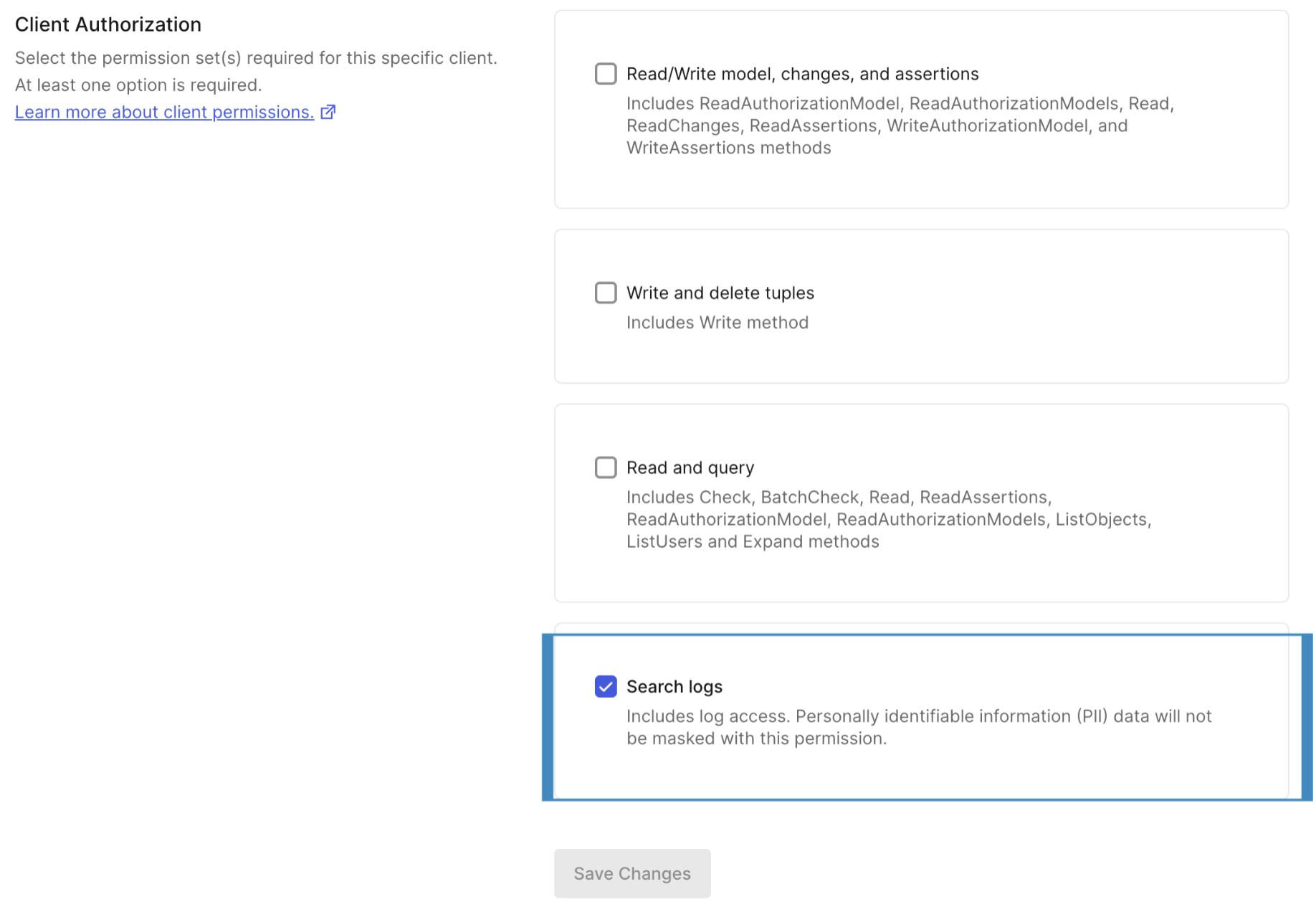
- API: Programmatic retrieval of logs for integration with external analytics tools. To retrieve logs, your API token must have the
Search logspermission set enabled via the FGA Management Dashboard (see screenshot below). Logs are retrieved using the same authentication mechanism as other FGA APIs.
View Logs in the Dashboard
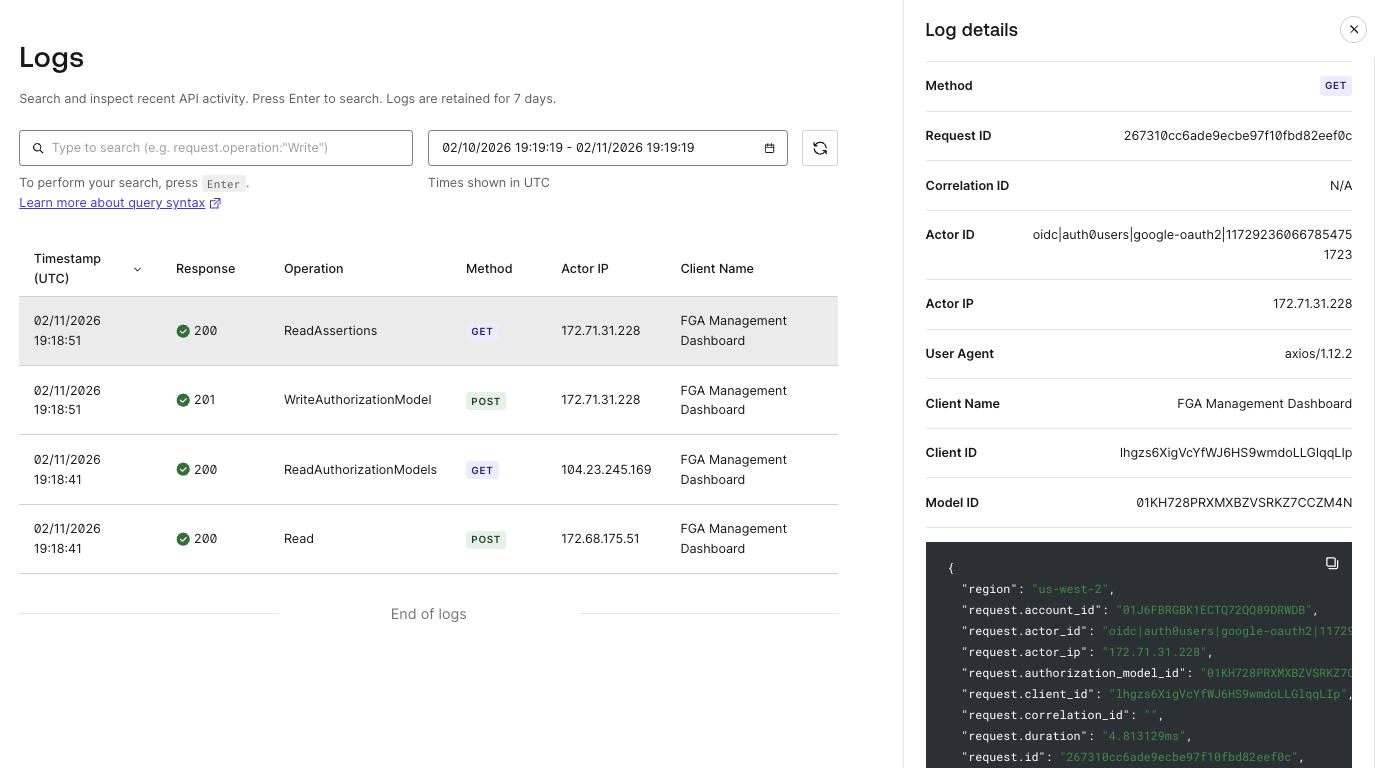
The Logs section in the FGA Management Dashboard allows you to inspect your store activity, enabling you to search and filter logs without manual API calls. The search box in the Dashboard supports the same Lucene query syntax as the API's query parameter, so you can use any of the query patterns documented below.
- Navigate to your Store in the FGA Dashboard.
- Select Logs from the left-hand sidebar.
- Use the search box to filter logs using query syntax (e.g.,
request.operation:"Write"), and/or use the date range picker to constrain results. - Select any log entry to view the full details in the right-hand panel, including all request fields, response metadata, and the raw JSON payload. This is a convenient way to discover queryable field names for each operation type.
Logging API
The Logging API is designed to provide authorization activity in a standardized format for developers, platform engineers, and compliance teams.
Log schema
Each log entry captures request metadata, response details, and operation-specific payload. Below is a sample for the
Write() endpoint:
{
  "timestamp": "2025-03-11T15:51:37.457Z",
  "region": "us-east-1",
  "request.id": "01JBCFKDVGMV2WH0RVPFDD7YXG",
  "request.duration": "658.455µs",
  "request.operation": "Write",
  "request.user_agent": "Go-SDK 1.2.3",
  "request.client_id": "gxcObq3LuTTfX4sczYGUzzDK7efifg2FITc",
  "request.authorization_model_id": "01JM23XPZT17STV45MQDSVAGNP",
  "request.store_id": "01JM23Y8QEJJH4KP526KXFRKVR",
  "request.account_id": "01JM23Z434H9TDXYBG5QQHMBKZ",
  "request.actor_id": "user:actor-id",
  "request.actor_ip": "192.168.1.100",
  "request.correlation_id": "0ae9b241738f3f53f5758db39da8c2f2",
  "request.writes": {
    "on_duplicate": "ignore",
    "tuple_keys": [
      {
        "user": "user:anne",
        "relation": "reader",
        "object": "document:2021-budget",
        "condition": {
          "name": "condition1",
          "context": "{\"grant_time\":\"2023-05-08T12:00:00Z\"}"
        }
      }
    ]
  },
  "response.headers": {
    "FGA-Query-Duration-MS": "0",
    "FGA-Request-Id": "3c8b9aba6b3aa428b0cb1f5cb1d7a301",
    "Openfga-Authorization-Model-Id": "01JZMWHZ11833P6GZHYTKXYGKJS",
    "x-ratelimit-limit": "20",
    "x-ratelimit-remaining": "19",
    "x-ratelimit-reset": "1751974302"
  },
  "request.deletes": {
    "on_missing": "error",
    "tuple_keys": [
      {
        "user": "user:anne",
        "relation": "reader",
        "object": "document:2021-budget"
      }
    ]
  },
  "response.status_code": 200
}
All FGA API operations are logged and follow the same general structure, with operation-specific payload fields. For example, Write logs include request.writes and request.deletes arrays, while Check logs include request.tuple_key fields.
Supported Query Parameters
The Auth0 FGA Logging API allows you to filter and retrieve logs using a set of query parameters. These parameters enable you to narrow down your search and analyze log data efficiently.
| Parameter | Description | Type | Values | Required / Optional |
|---|---|---|---|---|
start_time | Start time for the period of interest. Ignored if continuation_token is provided. | string | ISO 8601 (RFC3339) Date-Time in UTC. Must be within the last 7 days from the current time. | Optional (default: now - 7 days) |
end_time | End time for the period of interest. Ignored if continuation_token is provided. | string | ISO 8601 (RFC3339) Date-Time in UTC. Must be >= start_time. | Optional (default: now) |
page_size | Number of entries to return. | number | Minimum: 1. Maximum: 100. | Optional (default: 50) |
continuation_token | Opaque cursor for fetching the next page. Omit (or leave blank) on the first request. Takes precedence over start_time when both are provided. | string | An opaque token carrying the full pagination context. | Optional |
query | Search criteria using Lucene-like query string syntax. Values containing a colon must be quoted, e.g., 'user:Anne'. | string | For example, request.client_id:ABC123. | Optional |
sort | Sort order for the results based on timestamp. Ignored if continuation_token is provided. | string | timestamp:1 (ascending) or timestamp:-1 (descending). | Optional (default: timestamp:1) |
Log Search Query Syntax
When searching for logs, you can create queries using a subset of Lucene query syntax to refine your search.
- A term can be a single word such as jane or smith.
- A term can be a phrase in single quotes ('customer log').
- Multiple terms can be grouped with parentheses to form sub-queries.
- All search fields are case sensitive.
- Operators (AND, OR, NOT) work on all searchable fields.
Supported Operations
The request.operation field identifies the API operation that generated the log entry. The following values are valid:
| Operation | Description |
|---|---|
Read | Read relationship tuples |
Write | Write relationship tuples |
Check | Check authorization |
Expand | Expand relationship paths |
ListObjects | List objects a user has access to |
StreamedListObjects | Streamed list objects |
ListUsers | List users with access to an object |
BatchCheck | Batch authorization checks |
ReadChanges | Read relationship tuple changes (watch) |
ReadAuthorizationModels | List authorization models |
ReadAuthorizationModel | Read a specific authorization model |
WriteAuthorizationModel | Write an authorization model |
ReadAssertions | Read model assertions |
WriteAssertions | Write model assertions |
Each operation type has its own schema. Some fields are shared across all operations (such as request.id, request.client_id, and response.status_code), while others are specific to an operation (such as request.writes for Write or request.tuple_key for Check).
Common Searchable Fields
The following fields are shared across all or most log entries and can be used in queries:
Request metadata:
| Field | Description |
|---|---|
request.id | Unique request identifier |
request.operation | Operation type (see Supported Operations) |
request.duration | Request duration |
request.store_id | Store ID |
request.account_id | Account ID |
request.client_id | Client ID |
request.authorization_model_id | Authorization model ID |
request.user_agent | SDK or client user agent string |
Contextual headers (set by the caller):
| Field | Description |
|---|---|
request.actor_id | Actor or user identifier (set via X-FGA-Actor-ID header) |
request.actor_ip | IP address of actor (set via X-FGA-Forwarded-For header) |
request.correlation_id | Correlation ID for request tracking (set via X-Correlation-ID header) |
Operation-specific fields (examples):
| Field | Applicable Operations |
|---|---|
request.tuple_key.user | Check, Read, ListObjects, ListUsers, Expand |
request.tuple_key.relation | Check, Read, ListObjects, ListUsers, Expand |
request.tuple_key.object | Check, Read, ListObjects, ListUsers, Expand |
request.writes | Write |
request.deletes | Write |
Response and other fields:
| Field | Description |
|---|---|
response.status_code | HTTP response status code |
timestamp | Request timestamp (ISO 8601) |
region | Geographic region |
This is not an exhaustive list. Each operation may include additional fields specific to its request and response schema. To discover all available fields for a given operation:
- Filter logs by operation — via the API (
query=request.operation:Check) or the Dashboard search box. - Inspect the returned log entries, or click a log row in the Dashboard to view the full details panel and raw JSON payload.
- Use the field paths you find (e.g.,
request.tuple_key.object) to build more specific queries.
Query Examples
To retrieve logs, send a GET request to the /stores/{store_id}/logs endpoint.
Before you begin:
- Obtain your API token to call the Logging API.
- Set environment variables:
export FGA_API_URL="https://api.us1.fga.dev"
export FGA_STORE_ID="your_store_id"
export ACCESS_TOKEN="your_api_token"
Examples:
- Use defaults (last 7 days to now)
curl "$FGA_API_URL/stores/$FGA_STORE_ID/logs" -H "authorization: bearer $ACCESS_TOKEN"
- Filter by Time Range
curl "$FGA_API_URL/stores/$FGA_STORE_ID/logs?start_time=2025-07-03T15:11:11Z&end_time=2025-07-09T15:11:11Z" -H "authorization: bearer $ACCESS_TOKEN"
- Filter by Operation
curl "$FGA_API_URL/stores/$FGA_STORE_ID/logs?query=request.operation:Write" -H "authorization: bearer $ACCESS_TOKEN"
- Filter by Tuple keys (user value)
curl "$FGA_API_URL/stores/$FGA_STORE_ID/logs?query=request.tuple_key.user:'user:Anne'" -H "authorization: bearer $ACCESS_TOKEN"
- Paginate results
- First page (optionally constrain the window and page size):
curl "$FGA_API_URL/stores/$FGA_STORE_ID/logs?page_size=50" -H "authorization: bearer $ACCESS_TOKEN"
- Next page (use the
continuation_tokenreturned from the previous response):
curl "$FGA_API_URL/stores/$FGA_STORE_ID/logs?continuation_token=<TOKEN_FROM_PREVIOUS_RESPONSE>" -H "authorization: bearer $ACCESS_TOKEN"
Note: When passing a
continuation_tokenalong withstart_time, thecontinuation_tokentakes precedence.
- Retrieve results in descending order (most recent first):
curl "$FGA_API_URL/stores/$FGA_STORE_ID/logs?sort=timestamp:-1" -H "authorization: bearer $ACCESS_TOKEN"
Note: When passing a
continuation_tokenalong withsort, thecontinuation_tokentakes precedence.
- Combine conditions with AND
curl "$FGA_API_URL/stores/$FGA_STORE_ID/logs?query=request.operation:Check AND response.status_code:200" -H "authorization: bearer $ACCESS_TOKEN"
- Exclude results with
-
curl "$FGA_API_URL/stores/$FGA_STORE_ID/logs?query=-request.operation:ReadAuthorizationModels" -H "authorization: bearer $ACCESS_TOKEN"
- Filter by response status code
curl "$FGA_API_URL/stores/$FGA_STORE_ID/logs?query=response.status_code:400" -H "authorization: bearer $ACCESS_TOKEN"
- Filter by client ID
curl "$FGA_API_URL/stores/$FGA_STORE_ID/logs?query=request.client_id:ABC123" -H "authorization: bearer $ACCESS_TOKEN"
- Filter by actor
curl "$FGA_API_URL/stores/$FGA_STORE_ID/logs?query=request.actor_id:'user:admin-service'" -H "authorization: bearer $ACCESS_TOKEN"
Setting Contextual Parameters as Headers
You can pass optional contextual headers with each request to provide richer traceability and auditing context:
-
Actor ID
(X-FGA-Actor-ID): Identifies the user or service principal initiating the API request that could affect authorization data. Example:"X-FGA-Actor-ID": "user-123"or"X-FGA-Actor-ID": "service-account-billing-job". -
IP Address
(X-FGA-Forwarded-For): Captures the originating IP address of the actor making the request. Example:"X-FGA-Forwarded-For": "192.123.1.1". -
Correlation ID
(X-Correlation-ID): A unique identifier provided by the calling application to track a single logical operation across multiple services or requests. Example:"X-Correlation-ID": "abc234-dfg345-jhk3"
These values are captured in the Logging API schema under:
-
X-FGA-Actor-ID→request.actor_id -
X-FGA-Forwarded-For→request.actor_ip -
X-Correlation-ID→request.correlation_id
Below is a reference code snippet showing how to pass these headers:
- Node.js
- Python
- .NET
- Java
- Go
- curl
Initialize the SDK
// Checkout the "How to Setup the SDK Client" page for more details.
const { CredentialsMethod, OpenFgaClient } = require('@openfga/sdk'); // OR import { CredentialsMethod, OpenFgaClient } from '@openfga/sdk';

// Ensure the environment variables are set
// FGA_API_URL = 'https://api.us1.fga.dev' // 'https://api.eu1.fga.dev' for EU and 'https://api.au1.fga.dev' for AU
// FGA_STORE_ID = 'YOUR_STORE_ID' - Get this from your store settings in the dashboard, refer to the "How to get your API Keys" page
// FGA_MODEL_ID = 'YOUR_MODEL_ID' - optional, can be overridden per request, helps reduce latency
// FGA_API_TOKEN_ISSUER = 'auth.fga.dev'
// FGA_API_AUDIENCE = 'https://api.us1.fga.dev/' // 'https://api.eu1.fga.dev/' for EU and 'https://api.au1.fga.dev/' for AU
// FGA_CLIENT_ID = 'YOUR_CLIENT_ID' - Get this from your store settings in the dashboard, refer to the "How to get your API Keys" page
// FGA_CLIENT_SECRET = 'YOUR_CLIENT_SECRET' - Get this from your store settings in the dashboard, refer to the "How to get your API Keys" page

const fgaClient = new OpenFgaClient({
    apiUrl: process.env.FGA_API_URL,
    storeId: process.env.FGA_STORE_ID,
    authorizationModelId: process.env.FGA_MODEL_ID,
    credentials: { // Credentials are not needed if connecting to the Playground API
      method: CredentialsMethod.ClientCredentials,
      config: {
        apiTokenIssuer: process.env.FGA_API_TOKEN_ISSUER,
        apiAudience: process.env.FGA_API_AUDIENCE,
        clientId: process.env.FGA_CLIENT_ID,
        clientSecret: process.env.FGA_CLIENT_SECRET,
      },
    },
});
// Run a check
const { allowed } = await fgaClient.check({
    user: 'user:anne3',
    relation: 'viewer',
    object: 'document:0192ab2a-d83f-756d-9397-c5ed9f3cb69a',
  }, {
    authorizationModelId: '01HVMMBCMGZNT3SED4Z17ECXCA',
    headers: {
      "X-FGA-Actor-ID": "auth0|64cbb8c4c79cacf57b8b9ee7",
      "X-FGA-Forwarded-For": "192.168.1.100",
      "X-Correlation-ID": "0ae9b241738f3f53f5758db39da8c2f2",
  },
});

// allowed = true
Initialize the SDK
# Checkout the "How to Setup the SDK Client" page for more details.

import os
import openfga_sdk
from openfga_sdk.client import OpenFgaClient, ClientConfiguration
from openfga_sdk.credentials import Credentials, CredentialConfiguration

# FGA_API_URL = 'https://api.us1.fga.dev' // 'https://api.eu1.fga.dev' for EU and 'https://api.au1.fga.dev' for AU
# FGA_STORE_ID = 'YOUR_STORE_ID' - Get this from your store settings in the dashboard, refer to the "How to get your API Keys" page
# FGA_MODEL_ID = 'YOUR_MODEL_ID' - optional, can be overridden per request, helps reduce latency
# FGA_API_TOKEN_ISSUER = 'auth.fga.dev'
# FGA_API_AUDIENCE = 'https://api.us1.fga.dev/' // 'https://api.eu1.fga.dev/' for EU and 'https://api.au1.fga.dev/' for AU
# FGA_CLIENT_ID = 'YOUR_CLIENT_ID' - Get this from your store settings in the dashboard, refer to the "How to get your API Keys" page
# FGA_CLIENT_SECRET = 'YOUR_CLIENT_SECRET' - Get this from your store settings in the dashboard, refer to the "How to get your API Keys" page

async def main():
    credentials = Credentials(
      method='client_credentials',
      configuration=CredentialConfiguration(
          api_issuer= os.environ.get('FGA_API_TOKEN_ISSUER'),
          api_audience= os.environ.get('FGA_API_AUDIENCE'),
          client_id= os.environ.get('FGA_CLIENT_ID'),
          client_secret= os.environ.get('FGA_CLIENT_SECRET'),
      )
    )

    configuration = ClientConfiguration(
        api_url = os.environ.get('FGA_API_URL'), # required, e.g. https://api.fga.example
        store_id = os.environ.get('FGA_STORE_ID'), # optional, not needed for `CreateStore` and `ListStores`, required before calling for all other methods
        authorization_model_id = os.environ.get('FGA_MODEL_ID'), # Optional, can be overridden per request
    )

    # Enter a context with an instance of the OpenFgaClient
    async with OpenFgaClient(configuration) as fga_client:
        api_response = await fga_client.read_authorization_models()
        await fga_client.close()

asyncio.run(main())
options = {
    "authorization_model_id": "01HVMMBCMGZNT3SED4Z17ECXCA",
    "headers": {
        "X-FGA-Actor-ID": "auth0|64cbb8c4c79cacf57b8b9ee7",
        "X-FGA-Forwarded-For": "192.168.1.100",
        "X-Correlation-ID": "0ae9b241738f3f53f5758db39da8c2f2"
    }
}
body = ClientCheckRequest(
    user="user:anne3",
    relation="viewer",
    object="document:0192ab2a-d83f-756d-9397-c5ed9f3cb69a",
)

response = await fga_client.check(body, options)

# response.allowed = true
Initialize the SDK
// Checkout the "How to Setup the SDK Client" page for more details.
using OpenFga.Sdk.Client;
using OpenFga.Sdk.Client.Model;
using OpenFga.Sdk.Model;
using Environment = System.Environment;

namespace Example;

// Ensure the environment variables are set
// FGA_API_URL = 'https://api.us1.fga.dev' // 'https://api.eu1.fga.dev' for EU and 'https://api.au1.fga.dev' for AU
// FGA_STORE_ID = 'YOUR_STORE_ID' - Get this from your store settings in the dashboard, refer to the "How to get your API Keys" page
// FGA_MODEL_ID = 'YOUR_MODEL_ID' - optional, can be overridden per request, helps reduce latency
// FGA_API_TOKEN_ISSUER = 'auth.fga.dev'
// FGA_API_AUDIENCE = 'https://api.us1.fga.dev/' // 'https://api.eu1.fga.dev/' for EU and 'https://api.au1.fga.dev/' for AU
// FGA_CLIENT_ID = 'YOUR_CLIENT_ID' - Get this from your store settings in the dashboard, refer to the "How to get your API Keys" page
// FGA_CLIENT_SECRET = 'YOUR_CLIENT_SECRET' - Get this from your store settings in the dashboard, refer to the "How to get your API Keys" page

class MyProgram {
    static async Task Main() {
        var configuration = new ClientConfiguration() {
            ApiUrl = Environment.GetEnvironmentVariable("FGA_API_URL"),
            StoreId = Environment.GetEnvironmentVariable("FGA_STORE_ID"),
            AuthorizationModelId = Environment.GetEnvironmentVariable("FGA_MODEL_ID"),
            Credentials = new Credentials() { // Credentials are not needed if connecting to the Playground API
                Method = CredentialsMethod.ClientCredentials,
                Config = new CredentialsConfig() {
                    ApiTokenIssuer = Environment.GetEnvironmentVariable("FGA_API_TOKEN_ISSUER"),
                    ApiAudience = Environment.GetEnvironmentVariable("FGA_API_AUDIENCE"),
                    ClientId = Environment.GetEnvironmentVariable("FGA_CLIENT_ID"),
                    ClientSecret = Environment.GetEnvironmentVariable("FGA_CLIENT_SECRET"),
                }
            }
        };
        var fgaClient = new OpenFgaClient(configuration);
    }
}
var options = new ClientCheckOptions {
    AuthorizationModelId = "01HVMMBCMGZNT3SED4Z17ECXCA",
    Headers = new Dictionary<string, string> {
        { "X-FGA-Actor-ID", "auth0|64cbb8c4c79cacf57b8b9ee7" },
        { "X-FGA-Forwarded-For", "192.168.1.100" },
        { "X-Correlation-ID", "0ae9b241738f3f53f5758db39da8c2f2" }
    }
};
var body = new ClientCheckRequest {
    User = "user:anne3",
    Relation = "viewer",
    Object = "document:0192ab2a-d83f-756d-9397-c5ed9f3cb69a",
};
var response = await fgaClient.Check(body, options);

// response.Allowed = true
Initialize the SDK
// ApiTokenIssuer, ApiAudience, ClientId and ClientSecret are optional.
import dev.openfga.sdk.api.client.OpenFgaClient;
import dev.openfga.sdk.api.configuration.ClientConfiguration;
import dev.openfga.sdk.api.configuration.ClientCredentials;
import dev.openfga.sdk.api.configuration.Credentials;

// FGA_API_URL = 'https://api.us1.fga.dev' for Dev Preview and Early Access / 'https://api.playground.fga.dev' for the FGA Playground
// FGA_STORE_ID = 'YOUR_STORE_ID' - Get this from your store settings in the dashboard, refer to the "How to get your API Keys" page
// FGA_MODEL_ID = 'YOUR_MODEL_ID' - optional, can be overridden per request, helps reduce latency
// FGA_API_TOKEN_ISSUER = 'auth.fga.dev' for Dev Preview and Early Access / not needed for the FGA Playground
// FGA_API_AUDIENCE = 'https://api.us1.fga.dev/' for Dev Preview and Early Access / not needed for the FGA Playground
// FGA_CLIENT_ID = 'YOUR_CLIENT_ID' - Get this from your store settings in the dashboard, refer to the "How to get your API Keys" page / not needed for the FGA Playground
// FGA_CLIENT_SECRET = 'YOUR_CLIENT_SECRET' - Get this from your store settings in the dashboard, refer to the "How to get your API Keys" page / not needed for the FGA Playground

public class Example {
  public static void main(String[] args) throws Exception {
      var config = new ClientConfiguration()
              .apiUrl(System.getenv("FGA_API_URL")) // If not specified, will default to "https://localhost:8080"
              .storeId(System.getenv("FGA_STORE_ID")) // Not required when calling createStore() or listStores()
              .authorizationModelId(System.getenv("FGA_MODEL_ID")) // Optional, can be overridden per request
              .credentials(new Credentials(
                  new ClientCredentials()
                          .apiTokenIssuer(System.getenv("FGA_API_TOKEN_ISSUER"))
                          .apiAudience(System.getenv("FGA_API_AUDIENCE"))
                          .clientId(System.getenv("FGA_CLIENT_ID"))
                          .clientSecret(System.getenv("FGA_CLIENT_SECRET"))
              ));

      var fgaClient = new OpenFgaClient(config);
  }
}
var options = new ClientCheckOptions()
        .authorizationModelId("01HVMMBCMGZNT3SED4Z17ECXCA")
        .additionalHeaders(Map.of(
            "X-FGA-Actor-ID", "auth0|64cbb8c4c79cacf57b8b9ee7",
            "X-FGA-Forwarded-For", "192.168.1.100",
            "X-Correlation-ID", "0ae9b241738f3f53f5758db39da8c2f2"
          )
        );

var body = new ClientCheckRequest()
        .user("user:anne3")
        .relation("viewer")
        ._object("document:0192ab2a-d83f-756d-9397-c5ed9f3cb69a");

var response = fgaClient.check(body, options).get();

// response.getAllowed() = true
Initialize the SDK
// Checkout the "How to Setup the SDK Client" page for more details.
import (
    "os"

    openfga "github.com/openfga/go-sdk"
    . "github.com/openfga/go-sdk/client"
    "github.com/openfga/go-sdk/credentials"
)

// Ensure the environment variables are set
// FGA_API_URL = 'https://api.us1.fga.dev' // 'https://api.eu1.fga.dev' for EU and 'https://api.au1.fga.dev' for AU
// FGA_STORE_ID = 'YOUR_STORE_ID' - Get this from your store settings in the dashboard, refer to the "How to get your API Keys" page
// FGA_MODEL_ID = 'YOUR_MODEL_ID' - optional, can be overridden per request, helps reduce latency
// FGA_API_TOKEN_ISSUER = 'auth.fga.dev'
// FGA_API_AUDIENCE = 'https://api.us1.fga.dev/' // 'https://api.eu1.fga.dev/' for EU and 'https://api.au1.fga.dev/' for AU
// FGA_CLIENT_ID = 'YOUR_CLIENT_ID' - Get this from your store settings in the dashboard, refer to the "How to get your API Keys" page
// FGA_CLIENT_SECRET = 'YOUR_CLIENT_SECRET' - Get this from your store settings in the dashboard, refer to the "How to get your API Keys" page

func main() {
    fgaClient, err := NewSdkClient(&ClientConfiguration{
        ApiUrl:               os.Getenv("FGA_API_URL"),
        StoreId:              os.Getenv("FGA_STORE_ID"),
        AuthorizationModelId: os.Getenv("FGA_MODEL_ID"),
        Credentials: &credentials.Credentials{ // Credentials are not needed if connecting to the Playground API
            Method: credentials.CredentialsMethodClientCredentials,
            Config: &credentials.Config{
                ClientCredentialsClientId:       os.Getenv("FGA_CLIENT_ID"),
                ClientCredentialsClientSecret:   os.Getenv("FGA_CLIENT_SECRET"),
                ClientCredentialsApiAudience:    os.Getenv("FGA_API_AUDIENCE"),
                ClientCredentialsApiTokenIssuer: os.Getenv("FGA_API_TOKEN_ISSUER"),
            },
        },
    })

    if err != nil {
        // .. Handle error
    }
}
options := ClientCheckOptions{
    AuthorizationModelId: openfga.PtrString("01HVMMBCMGZNT3SED4Z17ECXCA"),
    RequestOptions: RequestOptions{
        Headers: map[string]string{
            "X-FGA-Actor-ID": "auth0|64cbb8c4c79cacf57b8b9ee7",
            "X-FGA-Forwarded-For": "192.168.1.100",
            "X-Correlation-ID": "0ae9b241738f3f53f5758db39da8c2f2"
        }
    }
}

body := ClientCheckRequest{
    User:     "user:anne3",
    Relation: "viewer",
    Object:   "document:0192ab2a-d83f-756d-9397-c5ed9f3cb69a",
}

data, err := fgaClient.Check(context.Background()).
    Body(body).
    Options(options).
    Execute()

// data = { allowed: true }
Set the environment variables according to the "How to get your API keys"
Set the required environment variables
# For all environments
export FGA_STORE_ID = 'YOUR_STORE_ID' # Get this from your store settings in the dashboard, refer to the "How to get your API Keys" page
export FGA_MODEL_ID = 'YOUR_MODEL_ID' # optional, can be overridden per request, helps reduce latency

export FGA_API_URL = 'https://api.us1.fga.dev/' // 'https://api.eu1.fga.dev/' for EU and 'https://api.au1.fga.dev/' for AU
export FGA_API_TOKEN_ISSUER = 'auth.fga.dev'
export FGA_API_AUDIENCE = 'https://api.us1.fga.dev/' // 'https://api.eu1.fga.dev/' for EU and 'https://api.au1.fga.dev/' for AU
export FGA_CLIENT_ID = 'YOUR_CLIENT_ID' # Get this from your store settings in the dashboard, refer to the "How to get your API Keys" page
export FGA_CLIENT_SECRET = 'YOUR_CLIENT_SECRET' # Get this from your store settings in the dashboard, refer to the "How to get your API Keys" page
curl -X POST $FGA_API_URL/stores/$FGA_STORE_ID/check \
  -H "Authorization: Bearer $FGA_API_TOKEN" \ # Not needed if service does not require authorization
  -H "content-type: application/json" \
  -H "X-FGA-Actor-ID: auth0|64cbb8c4c79cacf57b8b9ee7" \
  -H "X-FGA-Forwarded-For: 192.168.1.100" \
  -H "X-Correlation-ID: 0ae9b241738f3f53f5758db39da8c2f2" \
  -d '{
    "authorization_model_id": "01HVMMBCMGZNT3SED4Z17ECXCA",
    "tuple_key": {
      "user": "user:anne3",
      "relation": "viewer",
      "object": "document:0192ab2a-d83f-756d-9397-c5ed9f3cb69a"
    }
  }'

# Response: {"allowed": true}
The Logging API won't have CLI or SDK support; you should use direct REST calls to call this API.
Export Logs to External Systems
You can build automated scripts to export FGA logs to external data sinks for long-term storage, analytics, or compliance purposes. The examples below demonstrate polling the Logging API and saving logs to local files in JSONL format.
Important considerations:
- The polling frequency in these examples is set to 1 hour - adjust this based on your use case and rate limits
- Consider your tier's rate limits when setting polling intervals (Free: 1 RPS, Enterprise: 8 RPS)
- Logs are retained for 7 days, so ensure your export frequency captures all necessary data
- Each example handles pagination using continuation tokens to retrieve all available logs
- Node.js
- Python
- .NET
- Java
- Go
- curl
import fs from 'node:fs';
import fetch from 'node-fetch'; // If using Node < 18 add dependency

const BASE_URL = process.env.FGA_API_URL || 'https://api.us1.fga.dev';
const STORE_ID = process.env.FGA_STORE_ID;
const TOKEN = process.env.FGA_API_TOKEN; // Bearer token
const FILE = 'logs_' + STORE_ID + '.jsonl';

if (!STORE_ID || !TOKEN) {
console.error('Missing FGA_STORE_ID or FGA_API_TOKEN');
process.exit(1);
}

async function pollOnce(continuation) {
const url = new URL(BASE_URL + '/stores/' + STORE_ID + '/logs');
if (continuation) url.searchParams.set('continuation_token', continuation);
const res = await fetch(url.toString(), {
  headers: { Authorization: 'Bearer ' + TOKEN, Accept: 'application/json' },
});
if (!res.ok) {
  console.error('API error', await res.text());
  return null;
}
return res.json();
}

async function pollLoop() {
console.log('Polling logs...');
let continuation = null;
let total = 0;
while (true) {
  const data = await pollOnce(continuation);
  if (!data || !data.logs || data.logs.length === 0) break;
  const lines = data.logs.map(l => JSON.stringify(l)).join('\n') + '\n';
  fs.appendFileSync(FILE, lines);
  total += data.logs.length;
  continuation = data.continuation_token || null;
  if (!continuation) break;
}
console.log('Saved ' + total + ' logs to ' + FILE);
}

(async () => {
while (true) {
  await pollLoop();
  await new Promise(r => setTimeout(r, 3600_000));
}
})();
import os, time, json, requests

BASE_URL = os.getenv('FGA_API_URL', 'https://api.us1.fga.dev')
STORE_ID = os.getenv('FGA_STORE_ID')
TOKEN = os.getenv('FGA_API_TOKEN')
FILE = f'logs_{STORE_ID}.jsonl'

if not STORE_ID or not TOKEN:
  raise SystemExit('Missing FGA_STORE_ID or FGA_API_TOKEN')

def fetch_page(continuation=None):
  url = f"{BASE_URL}/stores/{STORE_ID}/logs"
  params = {}
  if continuation:
      params['continuation_token'] = continuation
  r = requests.get(url, headers={'Authorization': f'Bearer {TOKEN}', 'Accept': 'application/json'}, params=params)
  if r.status_code != 200:
      print('API error', r.text)
      return None
  return r.json()

def poll_once():
  continuation = None
  total = 0
  while True:
      data = fetch_page(continuation)
      if not data or not data.get('logs'):
          break
      with open(FILE, 'a') as f:
          for log in data['logs']:
              f.write(json.dumps(log) + '\n')
              total += 1
      continuation = data.get('continuation_token') or None
      if not continuation:
          break
  print(f'Saved {total} logs to {FILE}')

while True:
  poll_once()
  time.sleep(3600)  # 1 hour
// Build & run: dotnet run
// Ensure your .csproj has (if needed):
// <PackageReference Include="System.Net.Http.Json" Version="8.0.0" />
using System; // Environment
using System.IO; // StreamWriter
using System.Linq; // ToArray()
using System.Text.Json;
using System.Net.Http;
using System.Threading.Tasks;

class PollLogs {
  static readonly string BaseUrl = Environment.GetEnvironmentVariable("FGA_API_URL") ?? "https://api.us1.fga.dev";
  static readonly string StoreId = Environment.GetEnvironmentVariable("FGA_STORE_ID") ?? "";
  static readonly string Token = Environment.GetEnvironmentVariable("FGA_API_TOKEN") ?? "";
  static readonly HttpClient Client = new HttpClient();
  static readonly string FilePath = $"logs_{StoreId}.jsonl";

  static async Task<(JsonElement[] logs, string continuation)> FetchAsync(string continuation) {
      var url = $"{BaseUrl}/stores/{StoreId}/logs" + (continuation != null ? $"?continuation_token={Uri.EscapeDataString(continuation)}" : "");
      using var req = new HttpRequestMessage(HttpMethod.Get, url);
      req.Headers.Add("Authorization", $"Bearer {Token}");
      req.Headers.Add("Accept", "application/json");
      var res = await Client.SendAsync(req);
      if (!res.IsSuccessStatusCode) {
          Console.Error.WriteLine("API Error: " + await res.Content.ReadAsStringAsync());
          return (Array.Empty<JsonElement>(), null);
      }
      using var stream = await res.Content.ReadAsStreamAsync();
      using var doc = await JsonDocument.ParseAsync(stream);
      var root = doc.RootElement;
      var logs = root.TryGetProperty("logs", out var logsProp) ? logsProp.EnumerateArray().ToArray() : Array.Empty<JsonElement>();
      var cont = root.TryGetProperty("continuation_token", out var c) ? c.GetString() : null;
      return (logs, cont);
  }

  static async Task PollOnce() {
      string continuation = null; int total = 0;
      while (true) {
          var (logs, cont) = await FetchAsync(continuation);
          if (logs.Length == 0) break;
          await using var fw = new StreamWriter(FilePath, append: true);
          foreach (var log in logs) { fw.WriteLine(log.ToString()); total++; }
          continuation = string.IsNullOrEmpty(cont) ? null : cont;
          if (continuation == null) break;
      }
      Console.WriteLine($"Saved {total} logs to {FilePath}");
  }

  static async Task Main() {
      if (string.IsNullOrEmpty(StoreId) || string.IsNullOrEmpty(Token)) { Console.Error.WriteLine("Missing env vars"); return; }
      while (true) { await PollOnce(); await Task.Delay(TimeSpan.FromHours(1)); }
  }
}
import java.io.*;
import java.net.*;
import java.nio.charset.StandardCharsets;
import java.time.Instant;
import java.util.*;
import javax.net.ssl.HttpsURLConnection;
import com.fasterxml.jackson.databind.*;

public class PollLogs {
  static class LogResponse {
      public List<Map<String, Object>> logs;
      public String continuation_token;
  }

  private static void pollLogs(String baseURL, String storeID, String token, String filePath) throws Exception {
      ObjectMapper mapper = new ObjectMapper();
      int totalLogs = 0;
      String continuationToken = null;

      while (true) {
          String urlStr = baseURL + "/stores/" + storeID + "/logs";
          if (continuationToken != null) {
              urlStr += "?continuation_token=" + URLEncoder.encode(continuationToken, StandardCharsets.UTF_8);
          }
          URL url = new URL(urlStr);
          HttpsURLConnection conn = (HttpsURLConnection) url.openConnection();
          conn.setRequestProperty("Authorization", "Bearer " + token);
          conn.setRequestProperty("Accept", "application/json");

          if (conn.getResponseCode() != 200) {
              try (BufferedReader br = new BufferedReader(new InputStreamReader(conn.getErrorStream()))) {
                  System.err.println("API Error: " + br.readLine());
              }
              return;
          }

          LogResponse data;
          try (InputStream is = conn.getInputStream()) {
              data = new ObjectMapper().readValue(is, LogResponse.class);
          }

          if (data.logs == null || data.logs.isEmpty()) {
              break;
          }

          try (FileWriter fw = new FileWriter(filePath, true)) {
              for (Map<String, Object> log : data.logs) {
                  fw.write(mapper.writeValueAsString(log) + "\n");
                  totalLogs++;
              }
          }

          if (data.continuation_token == null || data.continuation_token.isEmpty()) {
              break;
          }
          continuationToken = data.continuation_token;
      }

      System.out.printf("[%s] Saved %d logs to %s%n", Instant.now(), totalLogs, filePath);
  }

  public static void main(String[] args) throws Exception {
      String baseURL = "https://api.us1.fga.dev"; // or regional endpoint
      String storeID = "YOUR_STORE_ID";
      String token = System.getenv("FGA_API_TOKEN");
      if (token == null || token.isEmpty()) {
          System.err.println("Missing FGA_API_TOKEN");
          System.exit(1);
      }
      String filePath = "logs_" + storeID + ".jsonl";
      System.out.printf("Starting hourly log polling for store %s at %s%n", storeID, baseURL);
      while (true) {
          pollLogs(baseURL, storeID, token, filePath);
          Thread.sleep(3600_000); // 1 hour
      }
  }
}
package main

import (
"encoding/json"
"fmt"
"io"
"net/http"
"os"
"time"
)

var baseURL = getenv("FGA_API_URL", "https://api.us1.fga.dev")
var storeID = os.Getenv("FGA_STORE_ID")
var token = os.Getenv("FGA_API_TOKEN")
var filePath = fmt.Sprintf("logs_%s.jsonl", storeID)

func getenv(k, def string) string { v := os.Getenv(k); if v == "" { return def }; return v }

type logResponse struct {
Logs []map[string]any `json:"logs"`
ContinuationToken string `json:"continuation_token"`
}

func fetchPage(cont string) (*logResponse, error) {
url := fmt.Sprintf("%s/stores/%s/logs", baseURL, storeID)
if cont != "" { url += "?continuation_token=" + cont }
req, _ := http.NewRequest("GET", url, nil)
req.Header.Set("Authorization", "Bearer "+token)
req.Header.Set("Accept", "application/json")
resp, err := http.DefaultClient.Do(req)
if err != nil { return nil, err }
defer resp.Body.Close()
if resp.StatusCode != 200 { b,_ := io.ReadAll(resp.Body); return nil, fmt.Errorf("API error: %s", b) }
var data logResponse
if err := json.NewDecoder(resp.Body).Decode(&data); err != nil { return nil, err }
return &data, nil
}

func pollOnce() error {
cont := ""; total := 0
for {
  data, err := fetchPage(cont)
  if err != nil { return err }
  if data.Logs == nil || len(data.Logs) == 0 { break }
  f, _ := os.OpenFile(filePath, os.O_CREATE|os.O_WRONLY|os.O_APPEND, 0644)
  for _, l := range data.Logs { line, _ := json.Marshal(l); f.Write(append(line, '\n')) ; total++ }
  f.Close()
  if data.ContinuationToken == "" { break }
  cont = data.ContinuationToken
}
fmt.Printf("Saved %d logs to %s\n", total, filePath)
return nil
}

func main() {
if storeID == "" || token == "" { fmt.Println("Missing env vars"); return }
for { _ = pollOnce(); time.Sleep(time.Hour) }
}
# Run hourly (e.g., cron). Appends logs to a file.
# Requires: FGA_API_URL, FGA_STORE_ID, FGA_API_TOKEN
FILE="logs_$FGA_STORE_ID.jsonl"
CONTINUATION=""
while true; do
URL="$FGA_API_URL/stores/$FGA_STORE_ID/logs"
if [ -n "$CONTINUATION" ]; then
  URL="$URL?continuation_token=$CONTINUATION"
fi
RESP=$(curl -s -H "Authorization: Bearer $FGA_API_TOKEN" -H 'Accept: application/json' "$URL")
LOGS=$(echo "$RESP" | jq -c '.logs[]')
if [ -z "$LOGS" ]; then
  echo "No logs returned"; break
fi
echo "$LOGS" >> "$FILE"
CONTINUATION=$(echo "$RESP" | jq -r '.continuation_token // ""')
if [ -z "$CONTINUATION" ]; then
  break
fi
done
echo "Saved logs to $FILE"
# Sleep for an hour in a looping script: sleep 3600